vRAAS² RAAS for Microsoft Flight Simulator 2024
Spoken runway awareness and advisory callouts for every aircraft: runway entry and approach alerts, takeoff and landing distance remaining, unstable approach warnings and runway overrun prevention, configured from an EFB app.
Requires Microsoft Flight Simulator 2024


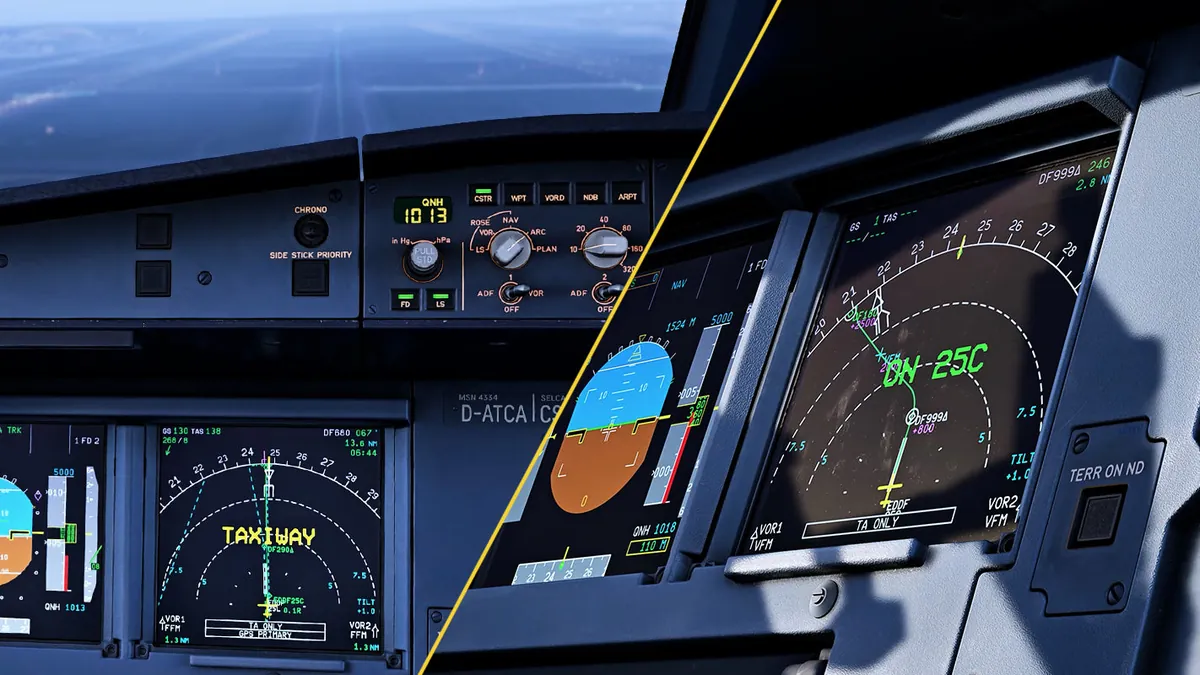
Airliner runway callouts, in every aircraft
vRAAS² adds the runway awareness and advisory callouts of a modern airliner to every aircraft in Microsoft Flight Simulator 2024: airliners, GA, and anything in between. It runs as an in-sim module: no external program, no companion app on the desktop, nothing to alt-tab to.
What is RAAS?
RAAS, the Runway Awareness and Advisory System, is a Honeywell function of the Enhanced Ground Proximity Warning System (EGPWS) found in many modern airliners. It gives the crew spoken advisories about where the aircraft is relative to runways, to prevent runway incursions, taxiway takeoffs and landings, and runway overruns. vRAAS² brings that RAAS logic to MSFS, alongside Airbus and Boeing style Runway Overrun Prevention. Read more about RAAS.
Taxi towards a runway and it tells you which one you are approaching. Line up and it confirms the runway and the distance available. Roll out and it counts the remaining distance down. On approach it calls the runway you are lined up with, warns you when the approach is not stable, and if the landing is going long it escalates to overrun prevention advisories: max braking, reverse, or go-around.
Everything is configured from a vRAAS² app inside the EFB, in the cockpit, while you fly. Settings apply globally, per aircraft type, or per individual registration, so a heavy jet and a Cub can each have their own thresholds without touching the other.
Clicking play loads the video from YouTube (Google). Your IP address is then sent to Google and YouTube may store cookies on your device. See our privacy policy (Datenschutzerklärung), or watch it on YouTube.
What vRAAS² does
Runway awareness
Approaching-runway and on-runway callouts while taxiing, with runway designator, plus taxiway-takeoff and short-runway warnings.
Takeoff and landing distance
Distance remaining callouts in feet or meters, distance available on lineup.
Approach advisories
Approaching-runway in the air, unstable approach, too high, too fast.
Runway Overrun Prevention (ROP)
Continuous landing distance assessment with escalating advisories (max braking, set/keep max reverse, go-around), following Airbus and Boeing style logic.
Altimeter monitoring
Transition altitude and altimeter setting reminders.
In-cockpit configuration
An EFB app for every setting, with global / per-type / per-registration override scopes and a one-tap revert to the inherited value.
Aircraft profiles
Vendor profiles are bundled and refreshed from the cloud, so common aircraft work correctly out of the box.
Startup self-test
A spoken test on power-up (and a TEST button in the EFB) so you know the system is alive before you need it.
Voices
Multiple callout voices to choose from.
What pilots say about vRAAS
A selection of customer reviews from the Contrail Shop, quoted unedited. These reviews were written for vRAAS 1.x, the predecessor of vRAAS². vRAAS² speaks the same callouts and keeps the same core features, now running inside the simulator.
I love vRAAS and honestly can't do a flight without anymore, adds alot to the realism i want in my flights and it has 0 impact on performance. Can't be more satisfied!
Chris Exactly how a flightsim addon should work - totally automated in the background, working with every airplane without needing to setup anything.
Raphael I like the fact that there is no impact on FPS. Setup and configuration is very intuitive, which is very welcomed. The announcements are very clear and timed very well. I like vRAAS. It is now part of my system on every flight and on every aircraft that I fly.
Jay I thoroughly enjoy the immersion provided by vRAAS. Good pricing, excellent features and customization and unbeatable support. Highly recommended.
A Must Have Add-On If it's your first time launching the app, you can leave it be on default settings and run a few flights. If you want to spend 2-3 minutes fine tweaking to your liking, it is straightforward. It does not impact your PC performance or at least from what I notice. It also launches automatically with the sim.
M. Absolute awesome addition to MSFS. It just works, and is easy to configure.
Hannes
4.73 out of 5 from 146 ratings (16 with a written review) on the Contrail Shop, as of . Read all reviews on the Contrail Shop.
Reviews and ratings are collected by the Contrail Shop. Only customers who own the product can rate or review it there, in the Contrail app. LAND3 Simulations does not check reviews beyond that and chose the quotes above from the reviews on Contrail.
Available callouts
Every callout can be customised or switched off from the EFB app. Advisories and cautions play at different volumes, just like the real system. Distances are spoken in meters or feet.
Self-test1
Self-test
Checks that vRAAS is working and announces the unit used for distance calls.
RUNWAY AWARENESS OKAY, METERS / FEET
RUNWAY AWARENESS INOP
RUNWAY AWARENESS R-T-O
Ground operations8
Approaching runway (on ground)
Approaching a runway while taxiing.
APPROACHING 25 LEFT
On runway
Confirms the runway when lining up.
ON RUNWAY 25 LEFT
Takeoff flaps configuration
Lining up without a valid takeoff flaps setting.
ON RUNWAY 25 LEFT. FLAPS! FLAPS!
Extended hold on runway
Holding on the runway for an extended time.
ON RUNWAY 25 LEFT. ON RUNWAY 25 LEFT.
Insufficient runway length on ground
Runway length available for takeoff is insufficient.
ON RUNWAY 25 LEFT. 500 METERS / FEET REMAINING
Short runway takeoff
Remaining runway length is shorter than nominal.
SHORT RUNWAY! SHORT RUNWAY!
Distance remaining (rejected takeoff)
Counts down the runway remaining after a rejected takeoff, in meters or feet.
1500 … 1200 … 900 …
Taxiway takeoff
Accelerating on a taxiway instead of a runway.
(CAUTION!) ON TAXIWAY! ON TAXIWAY!
Approach and landing5
Approaching runway (landing)
Approaching a runway in the air.
APPROACHING 25 LEFT
Approaching short runway
Runway length is shorter than the nominal landing distance.
APPROACHING 25 LEFT, 1400 METERS AVAILABLE
Short runway landing
Final approach to a short runway.
CAUTION SHORT RUNWAY, SHORT RUNWAY!
Taxiway landing
Lined up with a taxiway instead of a runway.
CAUTION TAXIWAY! CAUTION TAXIWAY!
Distance remaining (landing and rollout)
Counts down the runway remaining during landing and rollout, in meters or feet.
ONE THOUSAND … FIVE HUNDRED …
In-flight approach warnings3
Landing flaps not set
Landing flaps are not set.
FLAPS, FLAPS
Too high on approach
Above the approach path. Runway-specific steep approaches (such as London City) are recognised.
TOO HIGH, TOO HIGH
Too fast on approach
Faster than the target approach speed. Only available on aircraft that expose the required data.
TOO FAST, TOO FAST
Runway Overrun Prevention: on approach (below ~400 ft AGL)4
For Airbus aircraft the ROP callouts follow the Airbus ROPS specification, including the Step 2 and Step 2+ rollout alerts. Airbus Safety First: Further preventing runway overrun
If wet: runway too short Airbus
Advisory that the runway would be too short if wet.
IF WET: RUNWAY TOO SHORT
Runway too short (caution) Airbus
Dry landing distance exceeds the runway length available (amber).
RUNWAY TOO SHORT
Runway too short (warning) Airbus, below ~200 ft
Landing distance still exceeds the runway available (red).
RUNWAY TOO SHORT
Overrun, go around Boeing
Landing distance exceeds the runway available. Commands a go-around.
OVERRUN! GO AROUND!
Runway Overrun Prevention: on rollout (above ~30 kt)5
Max braking Airbus, Step 2
Overrun risk detected without braking applied.
BRAKE! MAX BRAKING! MAX BRAKING!
Set max reverse Airbus, Step 2+
Braking applied but reverse thrust not yet set.
SET MAX REVERSE!
Keep max reverse Airbus, 30–80 kt
Below 80 kt with overrun risk still present, reinforcing reverse usage.
KEEP MAX REVERSE!
Speedbrake Boeing
Overrun risk with speedbrakes not deployed.
SPEEDBRAKE! SPEEDBRAKE!
Max brakes, max reverse Boeing
Overrun risk with speedbrakes deployed but braking or reverse insufficient.
MAX BRAKES! MAX REVERSE!
Autobrake monitoring1
Autobrake off
Autobrake disengages during rollout above ~33 kt, catching accidental disarming before taxi speed.
AUTOBRAKE OFF
Supported aircraft
vRAAS² audio callouts work with every aircraft. The aircraft below ship with a tuned vendor profile. Display: RAAS text on the PFD or ND. ROP: Runway Overrun Prevention, predictive stopping-distance alerts during landing.
| Developer | Aircraft | Display | ROP | Note |
|---|---|---|---|---|
| Aerosoft | A340-600 | ✓ | ✓ | |
| BlueBird | B757 | ✓ | ✓ | |
| Contrail | Falcon FA50 | ✓ | No | |
| Fenix | A319/A320/A321 | ✓ | ✓ | |
| FlightSimStudio FSS | E-Jets | ✓ | No | |
| FlyByWire | A320neo | ✓ | ✓ | |
| FlyByWire | A380X | ✓ | No | |
| FSLabs | A319/A320/A321 | ✓ | ✓ | |
| FSS | B727 | No | No | Audio only, as the 727 has no displays |
| IniBuilds | A340 | ✓ | ✓ | |
| IniBuilds | A350 | ✓ | No | |
| Just Flight | Fokker F70/F100 | ✓ | No | |
| Microsoft (Default) | A330 | ✓ | ✓ | |
| Microsoft (Default) | Beluga XL | ✓ | ✓ | |
| PMDG | B737 | ✓ | ✓ | |
| PMDG | B777 | ✓ | ✓ | |
| ProSim | B737 | No | No | |
| TFDi | MD-11 | ✓ | ✓ |
Don't see your favourite aircraft? Send a request on our Discord.
Need help?
vRAAS² is an independent simulation add-on and is not affiliated with or endorsed by Honeywell, Airbus or Boeing. Honeywell, EGPWS, Airbus, Boeing and other names mentioned are trademarks of their respective owners.